

Generative AI (Gen AI) has shifted from experimental pilots to core production workloads. However, as applications scale to support thousands or millions of queries, infrastructure costs primarily driven by Large Language Model (LLM) inference, fine-tuning and vector retrieval can rapidly escalate out of control.
On Amazon Web Services (AWS), optimizing Gen AI costs requires more than just picking a smaller instance. It demands an end-to-end architectural strategy spanning model selection, caching, dynamic routing, retrieval optimization and infrastructure provisioning.
Here is a technical guide to building and operating cost-efficient Gen AI applications on AWS.
1. Right-Sizing Models: The "Right Model for the Job" Strategy
The single biggest cost driver in Gen AI applications is using an over-parameterized model (e.g., Claude 3.5 Sonnet or Anthropic Claude 3 Opus) for simple tasks that could be handled by lighter, specialized models (e.g., Claude 3 Haiku or Amazon Nova Micro).
Implementation Tactics:
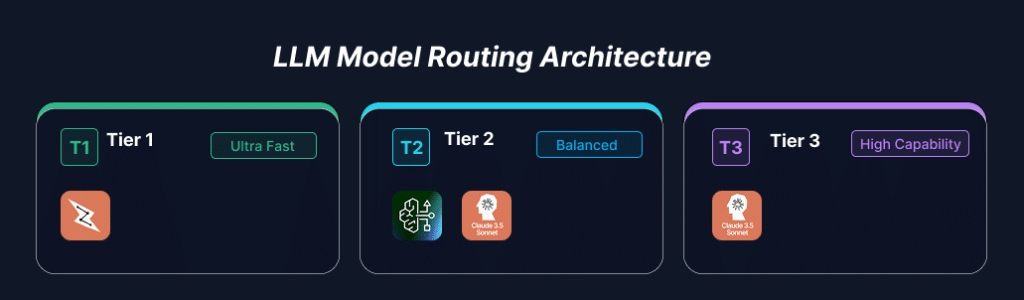
Model Cascading / Tiered Routing: Implement a lightweight classification layer (using AWS Lambda or lightweight models like Claude 3 Haiku) to evaluate incoming user queries by complexity.
1. Tier 1 (Simple Queries): Direct FAQ lookups or simple summaries to or Claude 3 Haiku.
2. Tier 2 (Moderate Tasks): Route standard reasoning tasks to Amazon Nova Lite or Claude 3.5 Sonnet.
3. Tier 3 (Complex Reasoning/Coding): Reserve high-parameter models like Claude 3.5 Sonnet / Opus strictly for edge cases requiring multi-step logic.
Fine-Tuning Small Language Models (SLMs): Instead of using prompt engineering on massive foundation models (FMs), fine-tune smaller open-weights models (e.g., Llama 3.2 1B/3B, Mistral 7B) on your specific domain dataset using Amazon SageMaker JumpStart. Deploying a fine-tuned 7B model on ml.g5.xlarge instances is often significantly cheaper per inference call than calling proprietary APIs at high volumes.
2. Optimizing Token Usage: Prompt & Cache Management
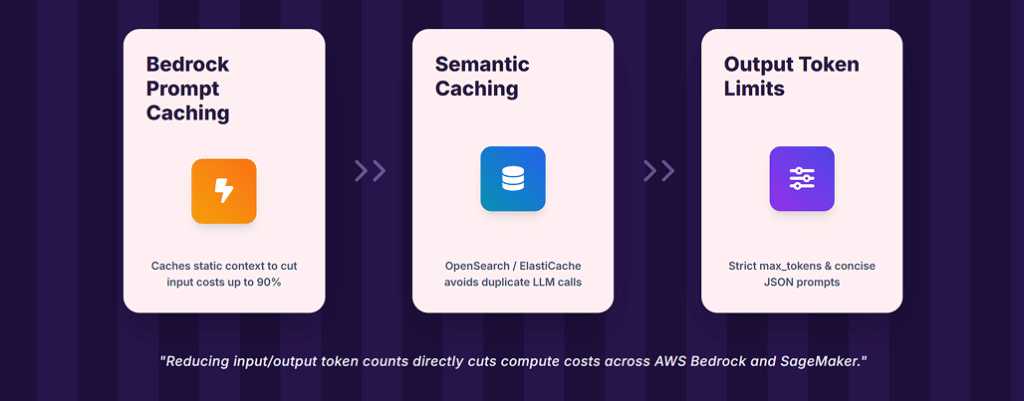
In Gen AI billing, tokens equal dollars. Reducing input/output token counts directly impacts your AWS Bedrock or SageMaker bill.
Implementation Tactics:
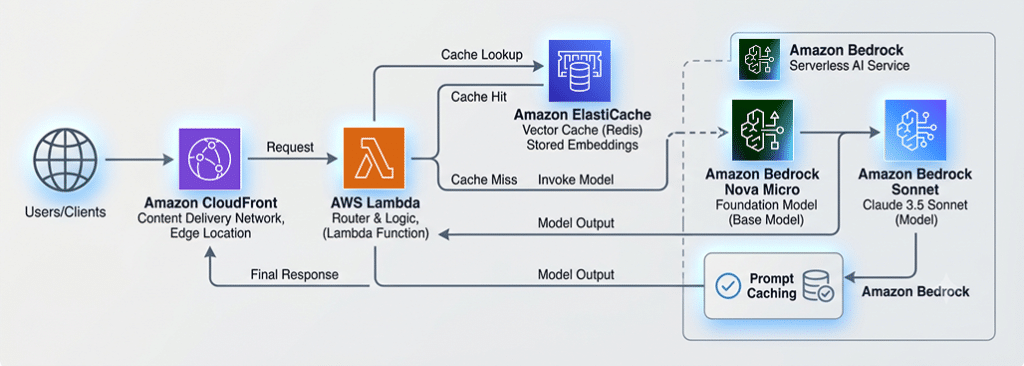
- Amazon Bedrock Prompt Caching: If your application repeatedly passes long system prompts, fixed context, or extensive retrieval documents (RAG), leverage Bedrock’s native prompt caching capabilities. Caching static prefixes reduces input token processing costs by up to 90% and decreases response latency.
- Semantic Caching with Amazon ElastiCache / OpenSearch: Don’t hit the LLM for identical or semantically similar queries.
- Store user query embeddings in Amazon ElastiCache for Redis or Amazon OpenSearch Serverless.
- When a new query arrives, perform a vector similarity search against the cache. If the cosine similarity exceeds a threshold (e.g., > 0.95), return the cached response immediately, incurring zero LLM cost.
- Output Token Limits: Set strict max_tokens limits. Guide models via system prompts to be concise (e.g., “Respond in JSON format with only key fields: [field1, field2]”). Less generated text equals lower costs.
3. Cost-Effective RAG Architecture (Retrieval-Augmented Generation)
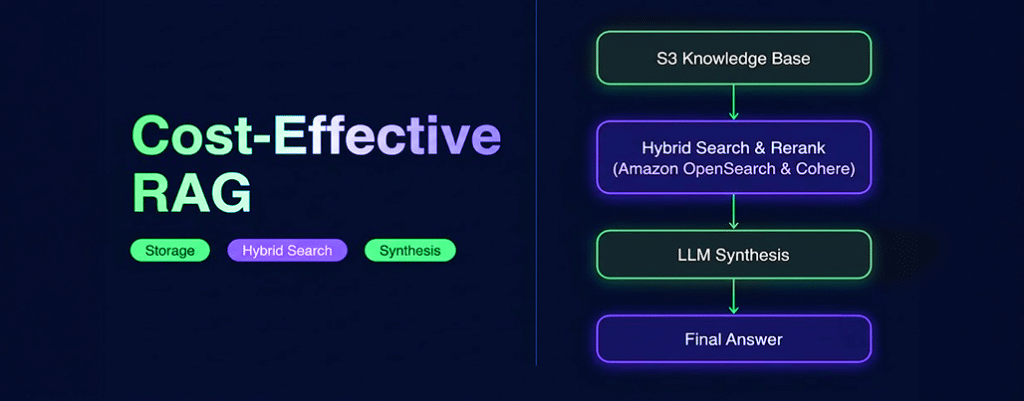
RAG reduces hallucinations and enables grounded responses, but poorly optimized vector search and document chunking can lead to inflated storage, indexing and token costs.
Implementation Tactics:
- Chunk Optimization: Over-chunking increases the number of retrieved segments sent in the LLM context window. Optimize chunk sizes (e.g., 512 tokens with 10% overlap) and use reranking models (e.g., Cohere Rerank on Bedrock) to send only the top 3-5 most relevant chunks to the final synthesis prompt rather than top 20 raw chunks.
- Hybrid Search with Amazon OpenSearch Serverless: Instead of relying purely on dense vector embeddings (which require expensive embedding processing and vector index memory), use a hybrid search strategy combining sparse BM25 keyword search with dense vector search. This improves relevance while keeping embedding storage costs manageable.
- Bedrock Knowledge Bases Auto-Sync: Schedule data source synchronization during off-peak hours or use incremental syncing so you only process newly added/modified documents in your Amazon S3 buckets rather than re-indexing entire repositories continuously.
4. Compute & Hosting Optimization on AWS
Whether you deploy proprietary FMs via Amazon Bedrock or self-host open-source models on Amazon SageMaker / EKS, choosing the right hosting model is critical.
Serverless vs. Provisioned Throughput on Amazon Bedrock:
- On-Demand (Pay-per-token): Best for unpredictable, bursty, or low-to-medium traffic workloads. You only pay for exact input/output tokens used.
- Provisioned Throughput: Best for stable, high-volume production traffic. You reserve Model Units (MUs) for committed timeframes (1-minute or 1-month/6-month commitments), providing guaranteed concurrency at a significantly lower effective cost per token.
Self-Hosting on Amazon SageMaker & AWS Inferentia2:
If hosting open-source models (Llama, Mistral, Falcon):
- AWS Inferentia2 (inf2 instances): Replace NVIDIA GPU instances with AWS Trainium/Inferentia2 chips. inf2 instances deliver up to 50% better performance-per-dollar over comparable GPU-based instances for LLM inference.
- SageMaker Multi-Model Endpoints (MME) / Asynchronous Endpoints:
- Use Asynchronous Inference for non-real-time batch processing (e.g., overnight document processing). SageMaker can scale instance counts down to zero when no requests are in the queue.
- Use Multi-Model Endpoints to host multiple fine-tuned models on a single GPU/CPU instance, maximizing hardware utilization.
5. FinOps, Monitoring and Governance for Gen AI
You cannot optimize what you do not measure. Traditional AWS Cost Explorer metrics don’t give token-level visibility out of the box.
Implementation Tactics:
- Token-Level Observability: Instrument your application using Amazon CloudWatch Custom Metrics or OpenTelemetry wrappers around Bedrock API calls to track:
- Input tokens per request / tenant
- Output tokens per request / tenant
- Latency vs. Cost trade-offs per model
- AWS Budgets & Cost Allocation Tags: Apply tags (CostCenter, Environment, ModelName, FeatureID) to Bedrock API calls, Lambda functions and SageMaker endpoints. Set up AWS Budgets alerts to notify engineering teams when daily token consumption exceeds expected baselines.
- Rate Limiting and Guardrails: Implement Amazon Bedrock Guardrails not only for safety, but to reject invalid, malicious, or prompt-injection requests before they consume downstream inference tokens.
Recommended Architecture Pattern
Here is a blueprint for a cost-optimized production Gen AI stack on AWS:
Summary Checklist for AWS Gen AI Cost Optimization
- Implement Model Tiering: Don’t use a heavy reasoning model for simple classification or summary tasks.
- Turn on Prompt Caching: Reduce input token costs on static system prompts and RAG contexts.
- Deploy Semantic Caching: Avoid calling LLMs for duplicate or near-duplicate queries using ElastiCache.
- Optimize RAG Payloads: Use rerankers to pass fewer, highly relevant chunks to the LLM.
- Leverage AWS Silicon: Test AWS Inferentia2 (inf2) for self-hosted LLMs on SageMaker.
- Set Up Token FinOps: Tag workloads, log custom token metrics in CloudWatch and set budget alarms.
Conclusion
Scaling Generative AI on AWS does not require an ever-expanding infrastructure budget. By shifting from a monolithic approach where a single foundation model processes every request to a layered, intelligent architecture, organizations can drastically reduce operational overhead. Combining dynamic model cascading, aggressive prompt and semantic caching, optimized RAG pipelines and specialized hardware like AWS Inferentia2 enables high performance at a fraction of the cost.
Cost optimization in Gen AI is not a one-time setup; it is an ongoing FinOps discipline. By establishing token-level observability in CloudWatch and regularly evaluating new model releases, platform teams can maintain low operational expenditure while delivering fast, high-quality AI experiences to end users.
Written by the Infimatrix Cloud and AI team.